" height="18.016311920580208px" id="GKXyVanMq" stroke-dasharray="0" stroke-linecap="butt" stroke-linejoin="miter" stroke-miterlimit="10" stroke-width="0.5" stroke="rgb(0, 0, 0)" transform="translate(3 3)" width="18px"/></svg>)
"/><stop offset="1" stop-color="rgb(227, 224, 244)"/></linearGradient><linearGradient id="CBS1bzkxF-2031533640-linear-gradient" x1="0.49751243781094523" x2="0.5024875621890548" y1="0" y2="1"><stop offset="0" stop-color="rgb(255, 255, 255)"/><stop offset="1" stop-color="rgb(227, 224, 244)"/></linearGradient><linearGradient id="Jd7AK81w9-2031533640-linear-gradient" x1="0.49751243781094523" x2="0.5024875621890548" y1="0" y2="1"><stop offset="0" stop-color="rgb(255, 255, 255)"/><stop offset="1" stop-color="rgb(227, 224, 244)"/></linearGradient></defs><g d="M 0 16 L 0 0 L 16 0 L 16 16 Z M 9.167 5.167 C 9.167 4.891 8.943 4.667 8.667 4.667 C 8.391 4.667 8.167 4.891 8.167 5.167 C 8.167 6.784 7.809 7.834 7.155 8.488 C 6.501 9.143 5.451 9.5 3.833 9.5 C 3.557 9.5 3.333 9.724 3.333 10 C 3.333 10.276 3.557 10.5 3.833 10.5 C 5.451 10.5 6.501 10.857 7.155 11.512 C 7.809 12.166 8.167 13.216 8.167 14.833 C 8.167 15.109 8.391 15.333 8.667 15.333 C 8.943 15.333 9.167 15.109 9.167 14.833 C 9.167 13.216 9.524 12.166 10.178 11.512 C 10.832 10.857 11.883 10.5 13.5 10.5 C 13.776 10.5 14 10.276 14 10 C 14 9.724 13.776 9.5 13.5 9.5 C 11.883 9.5 10.832 9.143 10.178 8.488 C 9.524 7.834 9.167 6.784 9.167 5.167 Z M 4 3.667 C 4 3.483 3.851 3.333 3.667 3.333 C 3.483 3.333 3.333 3.483 3.333 3.667 C 3.333 4.32 3.189 4.715 2.952 4.952 C 2.715 5.189 2.32 5.333 1.667 5.333 C 1.483 5.333 1.333 5.483 1.333 5.667 C 1.333 5.851 1.483 6 1.667 6 C 2.32 6 2.715 6.145 2.952 6.382 C 3.189 6.618 3.333 7.013 3.333 7.667 C 3.333 7.851 3.483 8 3.667 8 C 3.851 8 4 7.851 4 7.667 C 4 7.013 4.145 6.618 4.382 6.382 C 4.618 6.145 5.013 6 5.667 6 C 5.851 6 6 5.851 6 5.667 C 6 5.483 5.851 5.333 5.667 5.333 C 5.013 5.333 4.618 5.189 4.382 4.952 C 4.145 4.715 4 4.32 4 3.667 Z M 7.333 1 C 7.333 0.816 7.184 0.667 7 0.667 C 6.816 0.667 6.667 0.816 6.667 1 C 6.667 1.422 6.573 1.65 6.445 1.778 C 6.317 1.906 6.089 2 5.667 2 C 5.483 2 5.333 2.149 5.333 2.333 C 5.333 2.517 5.483 2.667 5.667 2.667 C 6.089 2.667 6.317 2.761 6.445 2.889 C 6.573 3.016 6.667 3.244 6.667 3.667 C 6.667 3.851 6.816 4 7 4 C 7.184 4 7.333 3.851 7.333 3.667 C 7.333 3.244 7.427 3.016 7.555 2.889 C 7.683 2.761 7.911 2.667 8.333 2.667 C 8.517 2.667 8.667 2.517 8.667 2.333 C 8.667 2.149 8.517 2 8.333 2 C 7.911 2 7.683 1.906 7.555 1.778 C 7.427 1.65 7.333 1.422 7.333 1 Z" fill="transparent" height="16px" id="aoZYv33vR" width="16px"><path d="M 0 16 L 0 0 L 16 0 L 16 16 Z" fill="transparent" height="16px" id="Z2uGmhW9f" width="16px"/><g d="M 7.833 4.5 C 7.833 4.224 7.609 4 7.333 4 C 7.057 4 6.833 4.224 6.833 4.5 C 6.833 6.117 6.476 7.168 5.822 7.822 C 5.168 8.476 4.117 8.833 2.5 8.833 C 2.224 8.833 2 9.057 2 9.333 C 2 9.61 2.224 9.833 2.5 9.833 C 4.117 9.833 5.168 10.191 5.822 10.845 C 6.476 11.499 6.833 12.549 6.833 14.167 C 6.833 14.443 7.057 14.667 7.333 14.667 C 7.609 14.667 7.833 14.443 7.833 14.167 C 7.833 12.549 8.191 11.499 8.845 10.845 C 9.499 10.191 10.549 9.833 12.167 9.833 C 12.443 9.833 12.667 9.61 12.667 9.333 C 12.667 9.057 12.443 8.833 12.167 8.833 C 10.549 8.833 9.499 8.476 8.845 7.822 C 8.191 7.168 7.833 6.117 7.833 4.5 Z M 2.667 3 C 2.667 2.816 2.517 2.667 2.333 2.667 C 2.149 2.667 2 2.816 2 3 C 2 3.654 1.855 4.048 1.618 4.285 C 1.382 4.522 0.987 4.667 0.333 4.667 C 0.149 4.667 0 4.816 0 5 C 0 5.184 0.149 5.333 0.333 5.333 C 0.987 5.333 1.382 5.478 1.618 5.715 C 1.855 5.952 2 6.346 2 7 C 2 7.184 2.149 7.333 2.333 7.333 C 2.517 7.333 2.667 7.184 2.667 7 C 2.667 6.346 2.811 5.952 3.048 5.715 C 3.285 5.478 3.68 5.333 4.333 5.333 C 4.517 5.333 4.667 5.184 4.667 5 C 4.667 4.816 4.517 4.667 4.333 4.667 C 3.68 4.667 3.285 4.522 3.048 4.285 C 2.811 4.048 2.667 3.654 2.667 3 Z M 6 0.333 C 6 0.149 5.851 0 5.667 0 C 5.483 0 5.333 0.149 5.333 0.333 C 5.333 0.756 5.239 0.984 5.112 1.112 C 4.984 1.239 4.756 1.333 4.333 1.333 C 4.149 1.333 4 1.483 4 1.667 C 4 1.851 4.149 2 4.333 2 C 4.756 2 4.984 2.094 5.112 2.222 C 5.239 2.35 5.333 2.578 5.333 3 C 5.333 3.184 5.483 3.333 5.667 3.333 C 5.851 3.333 6 3.184 6 3 C 6 2.578 6.094 2.35 6.222 2.222 C 6.35 2.094 6.578 2 7 2 C 7.184 2 7.333 1.851 7.333 1.667 C 7.333 1.483 7.184 1.333 7 1.333 C 6.578 1.333 6.35 1.239 6.222 1.112 C 6.094 0.984 6 0.756 6 0.333 Z" fill="transparent" height="14.66671286102295px" id="ae6ccdFme" transform="translate(1.333 0.667)" width="12.66663px"><path d="M 5.833 0.5 C 5.833 0.224 5.609 0 5.333 0 C 5.057 0 4.833 0.224 4.833 0.5 C 4.833 2.117 4.476 3.168 3.822 3.822 C 3.168 4.476 2.117 4.833 0.5 4.833 C 0.224 4.833 0 5.057 0 5.333 C 0 5.61 0.224 5.833 0.5 5.833 C 2.117 5.833 3.168 6.191 3.822 6.845 C 4.476 7.499 4.833 8.549 4.833 10.167 C 4.833 10.443 5.057 10.667 5.333 10.667 C 5.609 10.667 5.833 10.443 5.833 10.167 C 5.833 8.549 6.191 7.499 6.845 6.845 C 7.499 6.191 8.549 5.833 10.167 5.833 C 10.443 5.833 10.667 5.61 10.667 5.333 C 10.667 5.057 10.443 4.833 10.167 4.833 C 8.549 4.833 7.499 4.476 6.845 3.822 C 6.191 3.168 5.833 2.117 5.833 0.5 Z" fill="url(%23t2lXByE48-2031533640-linear-gradient)" height="10.66671px" id="t2lXByE48" transform="translate(2 4)" width="10.66663px"/><path d="M 2.667 0.333 C 2.667 0.149 2.517 0 2.333 0 C 2.149 0 2 0.149 2 0.333 C 2 0.987 1.855 1.382 1.618 1.618 C 1.382 1.855 0.987 2 0.333 2 C 0.149 2 0 2.149 0 2.333 C 0 2.517 0.149 2.667 0.333 2.667 C 0.987 2.667 1.382 2.811 1.618 3.048 C 1.855 3.285 2 3.68 2 4.333 C 2 4.517 2.149 4.667 2.333 4.667 C 2.517 4.667 2.667 4.517 2.667 4.333 C 2.667 3.68 2.811 3.285 3.048 3.048 C 3.285 2.811 3.68 2.667 4.333 2.667 C 4.517 2.667 4.667 2.517 4.667 2.333 C 4.667 2.149 4.517 2 4.333 2 C 3.68 2 3.285 1.855 3.048 1.618 C 2.811 1.382 2.667 0.987 2.667 0.333 Z" fill="url(%23CBS1bzkxF-2031533640-linear-gradient)" height="4.66667px" id="CBS1bzkxF" transform="translate(0 2.667)" width="4.66667px"/><path d="M 2 0.333 C 2 0.149 1.851 0 1.667 0 C 1.483 0 1.333 0.149 1.333 0.333 C 1.333 0.756 1.239 0.984 1.112 1.112 C 0.984 1.239 0.756 1.333 0.333 1.333 C 0.149 1.333 0 1.483 0 1.667 C 0 1.851 0.149 2 0.333 2 C 0.756 2 0.984 2.094 1.112 2.222 C 1.239 2.35 1.333 2.578 1.333 3 C 1.333 3.184 1.483 3.333 1.667 3.333 C 1.851 3.333 2 3.184 2 3 C 2 2.578 2.094 2.35 2.222 2.222 C 2.35 2.094 2.578 2 3 2 C 3.184 2 3.333 1.851 3.333 1.667 C 3.333 1.483 3.184 1.333 3 1.333 C 2.578 1.333 2.35 1.239 2.222 1.112 C 2.094 0.984 2 0.756 2 0.333 Z" fill="url(%23Jd7AK81w9-2031533640-linear-gradient)" height="3.333333px" id="Jd7AK81w9" transform="translate(4 0)" width="3.3333399999999997px"/></g></g></svg>)
" width="18px"><path d="M 2 8 C 0.895 8 0 7.105 0 6 L 0 2 C 0 0.895 0.895 0 2 0 L 6 0 C 7.105 0 8 0.895 8 2 L 8 6 C 8 7.105 7.105 8 6 8 Z" fill="transparent" height="8px" id="ZrCrI93dV" stroke-dasharray="" stroke-linecap="round" stroke-linejoin="round" stroke-width="2" stroke="rgb(0, 0, 0)" width="8px"/><path d="M 0 0 L 0 4 C 0 5.105 0.895 6 2 6 L 6 6" fill="transparent" height="6px" id="emltWYAiE" stroke-dasharray="" stroke-linecap="round" stroke-linejoin="round" stroke-width="2" stroke="rgb(0, 0, 0)" transform="translate(4 8)" width="6px"/><path d="M 2 8 C 0.895 8 0 7.105 0 6 L 0 2 C 0 0.895 0.895 0 2 0 L 6 0 C 7.105 0 8 0.895 8 2 L 8 6 C 8 7.105 7.105 8 6 8 Z" fill="transparent" height="8px" id="WpBecYDfi" stroke-dasharray="" stroke-linecap="round" stroke-linejoin="round" stroke-width="2" stroke="rgb(0, 0, 0)" transform="translate(10 10)" width="8px"/></g></svg>)

Recurring Appointment Scheduling: Maximize Efficiency with Cal.com
Recurring appointments can be difficult to manage manually. This article explains how automation improves efficiency, reduces no-shows, and simplifies scheduling. With features like reminders, calendar syncing, and workflows, Cal.com makes recurring appointment management simple and scalable.
If your business relies on recurring appointments, manual scheduling is costing you time, revenue, and client satisfaction. Cal.com simplifies recurring scheduling with automation, calendar syncing, smart reminders, and customizable workflows built for modern teams.
Instead of juggling spreadsheets and back-and-forth emails, you can automate confirmations, reduce no-shows, manage multi-location availability, and scale effortlessly as you grow.
Whether you’re a consultant, healthcare provider, fitness coach, or enterprise team, this guide will show you how to master recurring appointment scheduling.
The Importance of Efficient Appointment Scheduling in Business
Challenges of Manual Appointment Management
Manual appointment management is time-consuming, error-prone, and often leads to scheduling conflicts. Businesses that still rely on this method find themselves bogged down by inefficiencies.
Keeping track of appointments, rescheduling, and managing cancellations can become a logistical nightmare. This inefficiency not only impacts internal workflows but can also lead to a negative customer experience.
Client Satisfaction
Studies show that 50% of customers abandon a brand after 1 bad experience. And your appointment and booking flows significantly impact the customer experience.
A streamlined scheduling system makes it easier for clients to engage with businesses, enhancing their overall experience. Prompt service, minimal waiting times, and the ability to easily reschedule or cancel appointments contribute greatly to client contentment and loyalty.
Reduces Administrative Workload
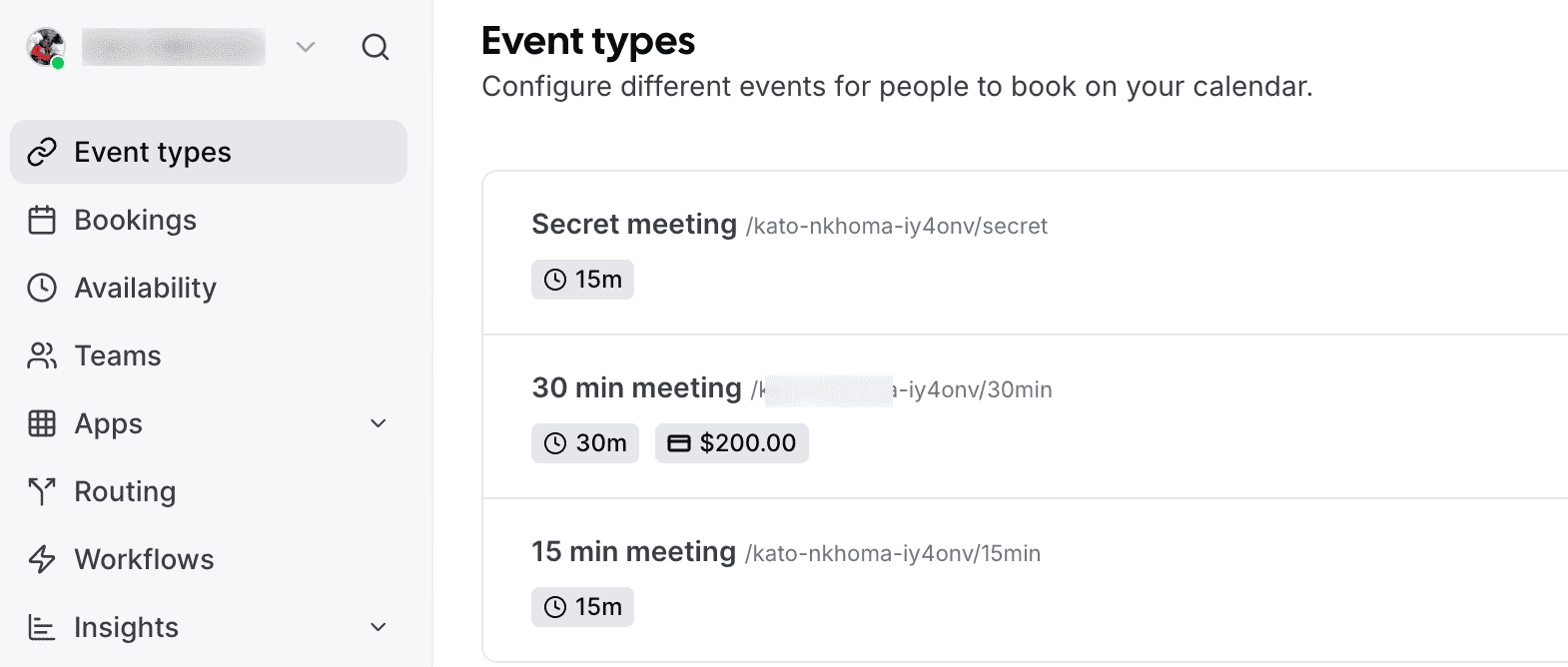
Modern appointment scheduling platforms offer robust automation features that streamline repetitive tasks, dramatically improving business efficiency. For example, automated reminders and confirmations via email or SMS help reduce no-shows and minimize manual follow-up. Scheduled payment processing ensures timely transactions without manual invoicing. With Cal.com, you can create bookable recurring events that include a payment link.
These systems can also handle recurring communications, such as follow-ups and feedback requests, freeing staff from routine outreach. By automating these essential yet time-consuming tasks, businesses can focus on delivering quality service, reducing administrative overhead, and maintaining a more organized workflow—all while enhancing the client experience through timely, consistent communication.
Industry-Specific Customization in Appointment Scheduling Tools
Many appointment scheduling tools are designed with industry-specific needs in mind. This enables businesses to tailor the booking experience to their unique workflows and regulatory requirements.
In healthcare, scheduling platforms often include HIPAA-compliant data handling, customizable intake forms for capturing patient information, and automated reminders to reduce no-shows. All are essential for maintaining patient privacy and enhancing patient care.
Educational institutions benefit from features such as class scheduling, group bookings, and attendance tracking. This makes it easy for teachers and students to coordinate lessons, office hours, and tutoring sessions.
Fitness professionals and gyms require flexible resource management, including assigning trainers to sessions, managing equipment and room availability, and offering recurring class schedules.
Beauty salons and spas often need multi-service booking, stylist or therapist selection, and the ability to manage multiple locations or staff shifts. Legal services, meanwhile, may prioritize secure document collection, appointment types for different consultation needs, and integration with client management systems.
So, which is the best recurring appointment scheduling software?
Cal.com: The Best Recurring Appointment Scheduling Software
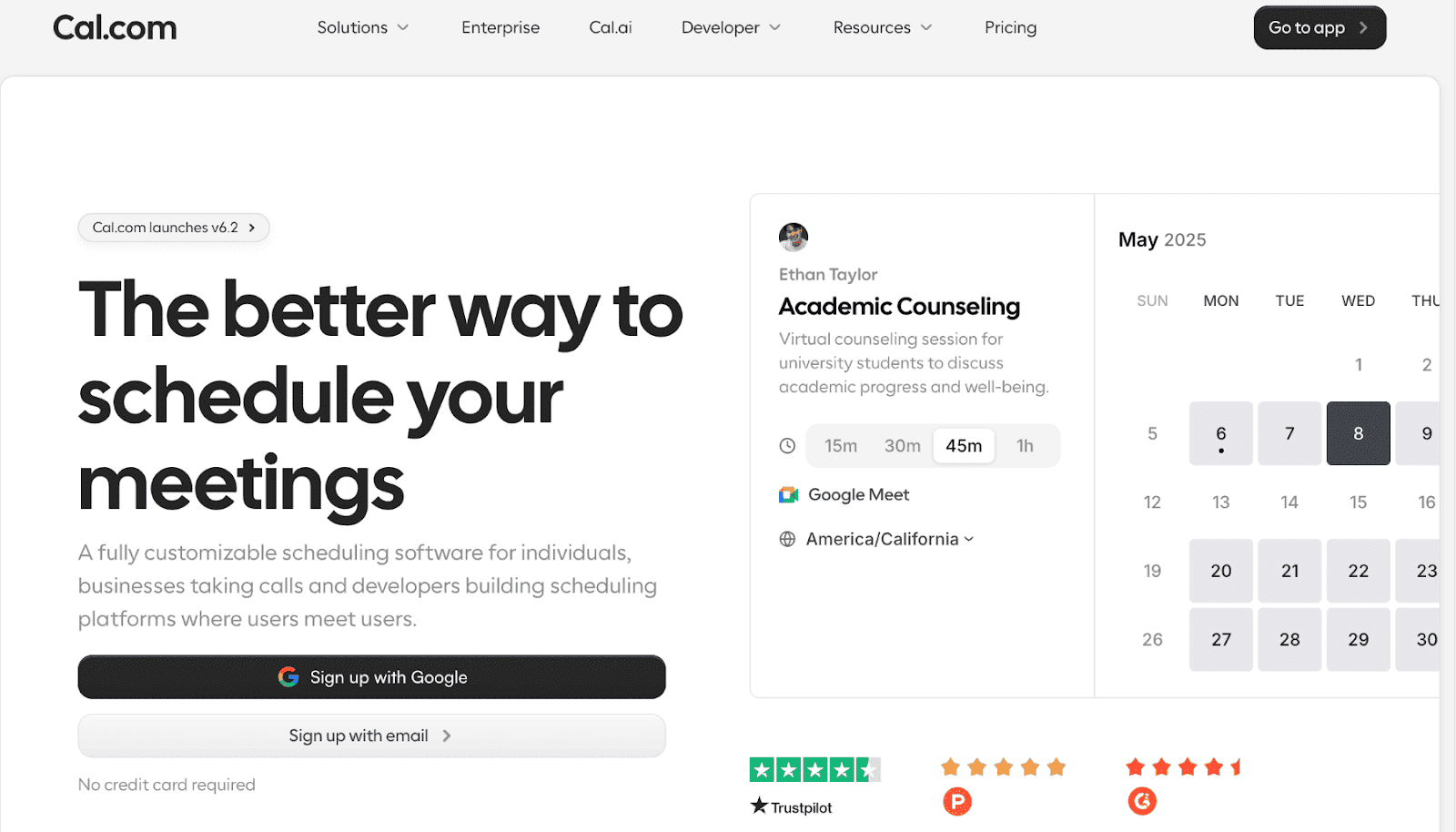
Cal.com is the best recurring appointment scheduling software, thanks to its robust feature set designed to meet diverse business needs. Key features include:
Custom email: Send emails directly from your domain (like you@yourcompany.com) and improve. This helps improve brand credibility, improves the booking experience, and provides better security flexibility.
Unlimited bookings: Take as many appointments as you need, even on the free plan. There are no artificial caps that force you to upgrade as your business grows.
Smart routing: Cal.com’s routing forms collect customer information automatically and direct clients to the right team member.
Custom booking links: Create branded, shareable booking links for individuals, teams, or specific services.
Workflow automation: Easily automate confirmations, reminders, and follow-ups. Customize every message to match your brand voice and reduce no-shows with no manual work.
Calendar sync: Fully integrates with Google Calendar, Outlook, Apple Calendar, and more. This makes double booking impossible. Changes sync instantly across all platforms.
Automated reminders: Cut down no-shows, boost attendance, and ensure optimal use of your time.
Team scheduling: Distribute tasks evenly across your team using the round-robin feature. Alternatively, let clients choose their preferred person.
Customizable booking pages: Fully branded booking pages with your logo, colors, and messaging to create a polished, professional experience
Time-based rules: Add buffers between appointments to avoid overlapping or to give yourself breathing space.
Multi-location support: Manage bookings across multiple locations from a single dashboard. Each can have its own calendars and booking rules for smoother coordination.
Multi-language support: Cal.com detects time zones and browser languages, making it ideal for multi-time-zone/multi-language meetings.
App Store: Connect Cal.com to your other favorite tools via our app store. This helps enhance automations and efficiency.
Another unique feature is Cal AI. This is an AI agent that turns simple scheduling into conversations. It can book meetings, send reminders, and follow up through natural phone calls, boosting conversions, reducing no-shows, saving time, and booking demos.

Trusted by brands like Deel, Supabase, Framer, Ramp, Vercel, and many more, Cal.com has proven to be a powerhouse in the scheduling tool space.
Here’s what users are saying about Cal.com:
I love using Cal.com for my scheduling because it avoids any kind of back and forth between people I need to meet, and it just makes things so easy. With Cal.com, I save a bunch of time since I don't need to ask people for their time availabilities. My team can see all of my availability and when I'm not available through my Cal.com scheduler. It's super easy to set up and took no time. I love how beautiful it looks, making everything appear really sleek. This aesthetic aspect helps because it makes the person more likely to actually go and pick a time, especially clients for my business. — G2 user
Annual Pricing (Per/Seat/Month)
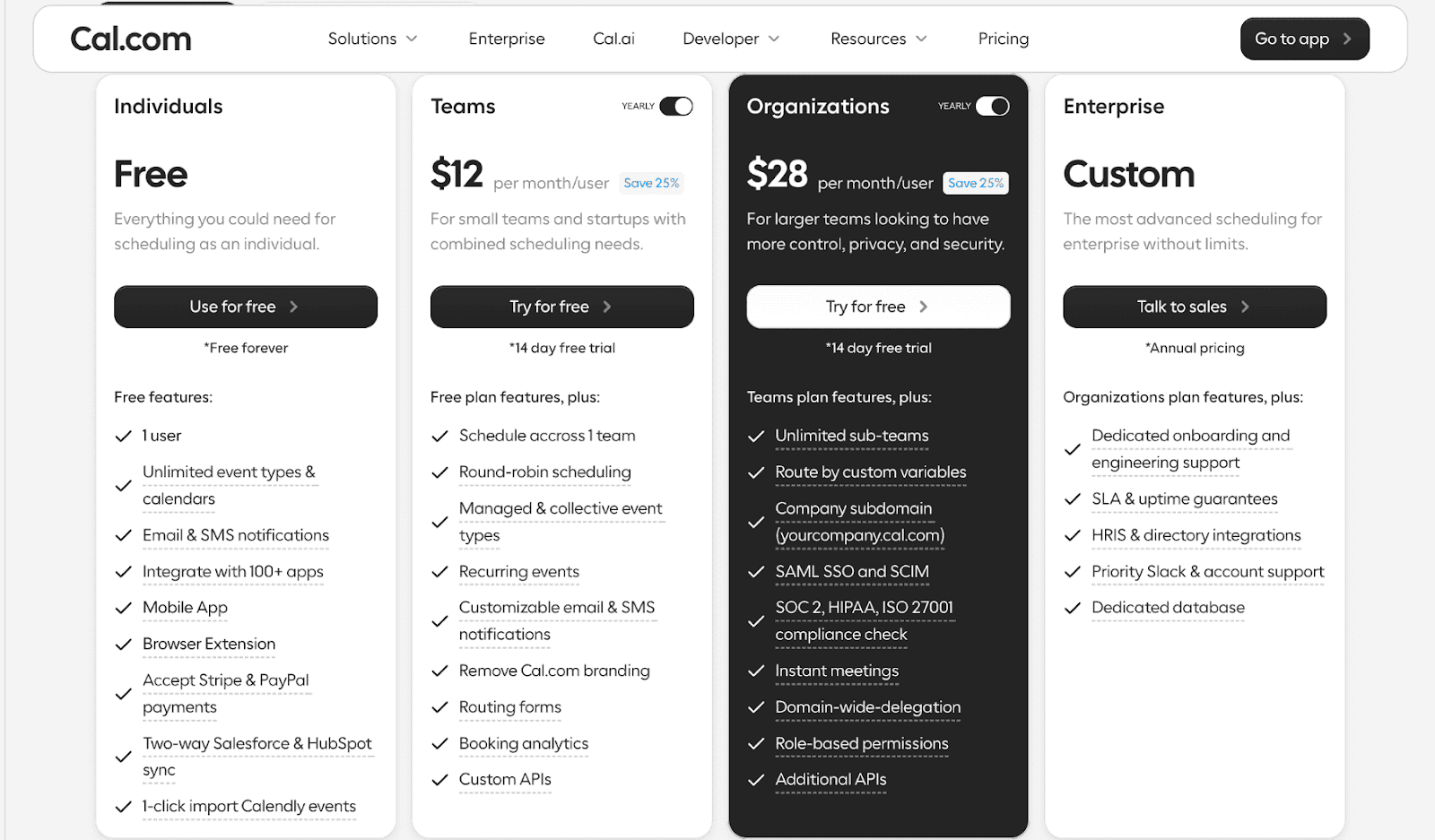
Individuals (Free): A forever-free plan that gives a single user unlimited calendars, event types, workflows, and integrations so solo professionals can schedule without limits.
Teams ($12/user/month): Designed for small teams, this plan builds on the free tier with team scheduling features like round-robin, collective events, advanced routing forms, and removes branding, plus email/chat support.
Organizations ($28/user/month): Ideal for larger groups needing more control, adding parent and sub-team structures, organization-wide workflows, custom subdomain and email, compliance (e.g., SOC2/HIPAA), and priority support.
Enterprise (Custom pricing): Tailored for big enterprises with advanced privacy, security, analytics, dedicated onboarding, and around-the-clock support, with features and pricing customized to the organization’s needs.
Unlike many scheduling tools on the market, Cal.com doesn't adopt a one-size-fits-all approach. It offers extensive customization options, enabling businesses to tailor the tool to their specific needs. Plus, integration with other platforms like Salesforce, Hubspot, and many others make it a versatile tool you can leverage to maximize the efficiency of your scheduling process.
Customer Support
Responsive customer support is the backbone of any service-oriented platform, and Cal.com excels in this regard.
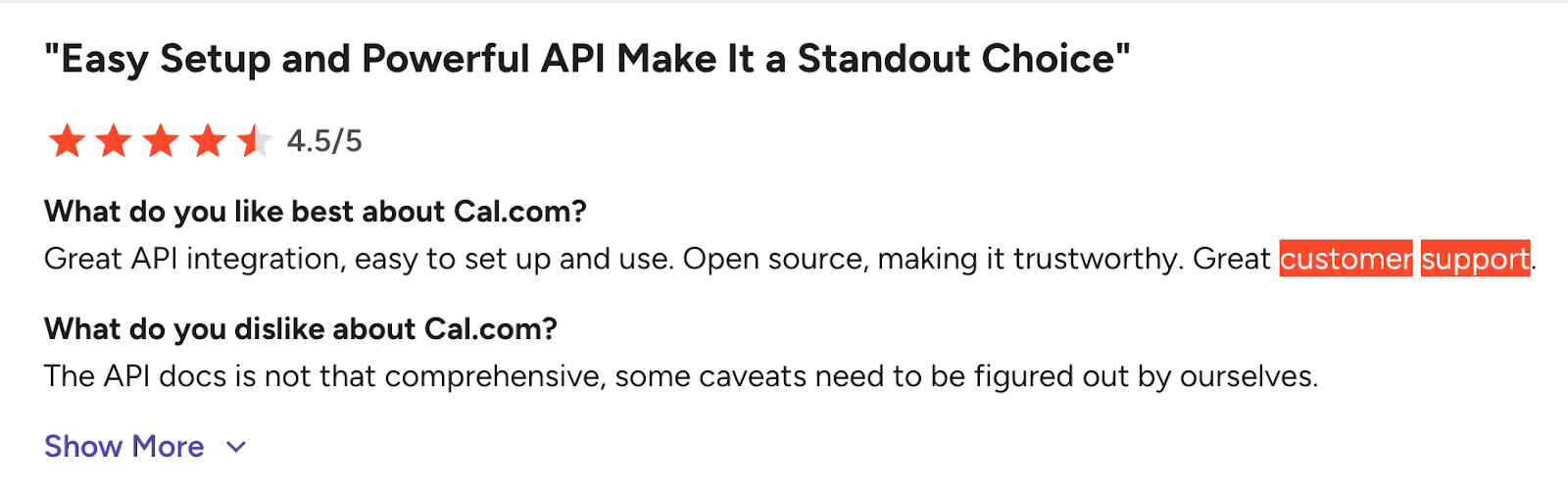
The platform is known for its responsive and efficient customer support team. Timely assistance and effective issue resolution not only enhance the user experience but also build trust and reliability.
Setting Up Cal.com for First-Time Users
Setting up Cal.com takes less than 10 minutes. Here's the complete process.
Step 1: Create Your Account
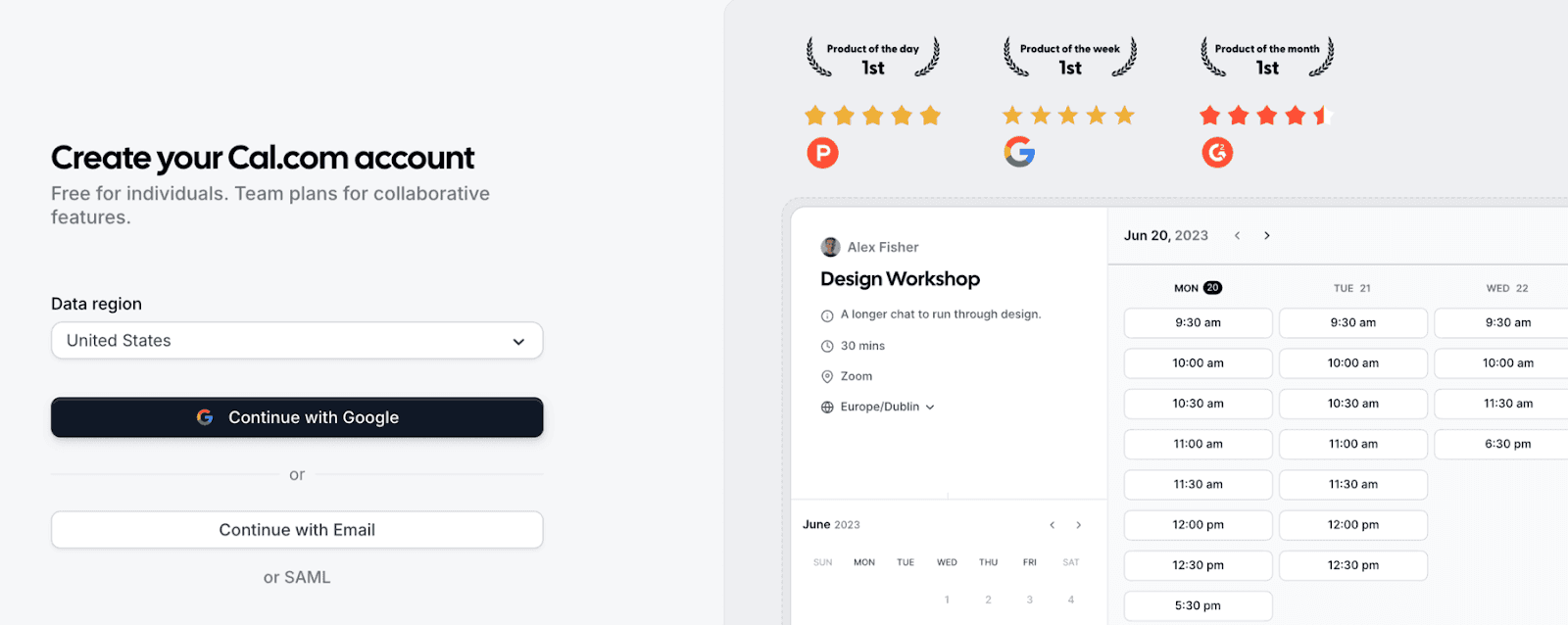
Visit Cal.com and click the "Get Started" button in the top right.
You have 3 signup options:
Email and password
Google account
SAML SSO (for enterprise users)
Step 2: Complete Your Profile
After signing up, Cal.com walks you through initial setup:
Enter your full name so clients know who they're meeting with
Select your primary time zone for an accurate availability display
Upload a profile picture to personalize your booking page (optional but recommended)
Add bio text describing your role or services (optional)
Step 3: Connect Your Calendars
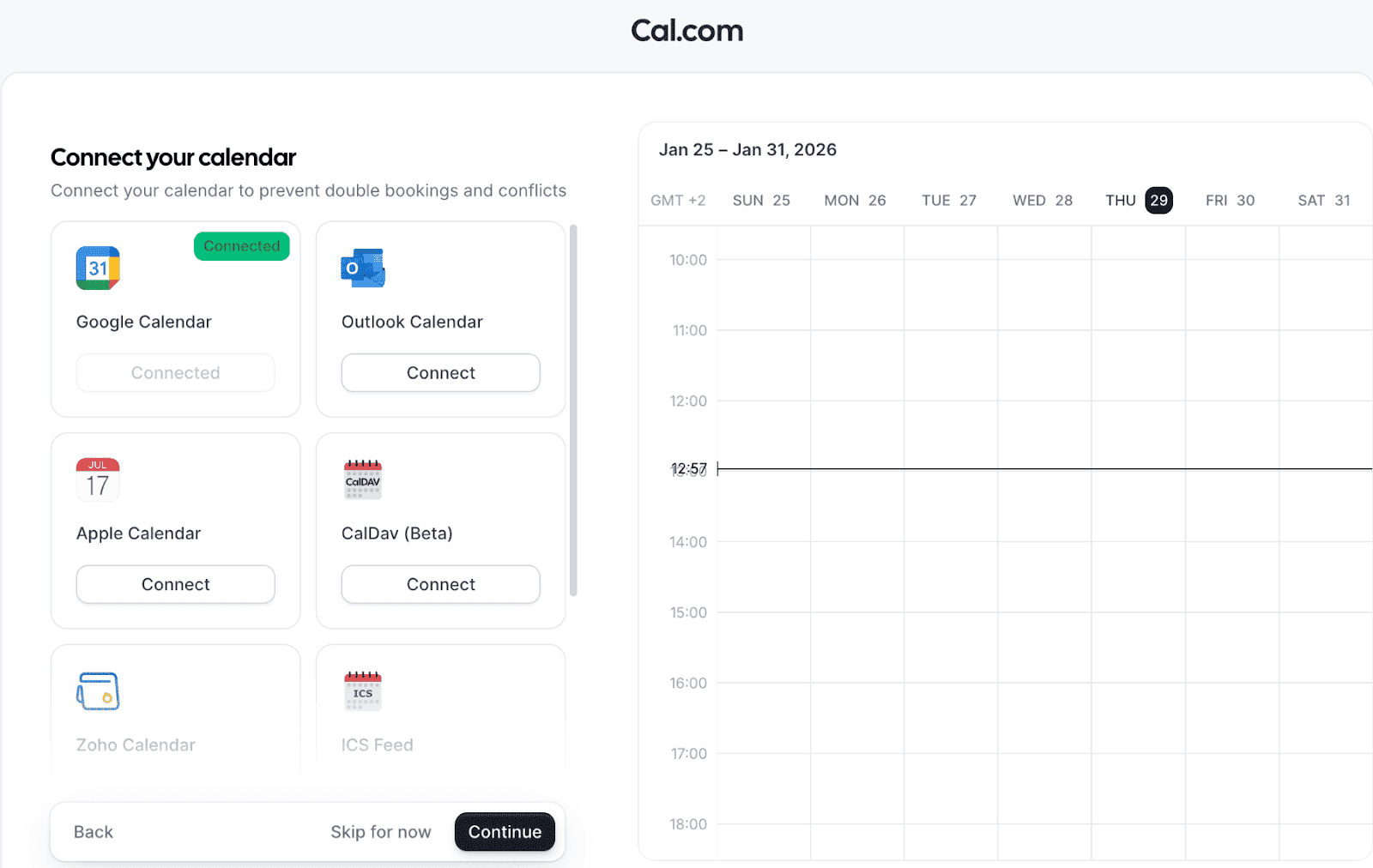
Cal.com checks your connected calendars for conflicts before accepting bookings.
Connect as many calendars as you use:
Google Calendar
Outlook/Office 365
Apple Calendar (via iCloud)
CalDAV
The platform syncs in real-time. Changes in your calendar appear instantly in your availability.
Step 4: Set Your Default Availability
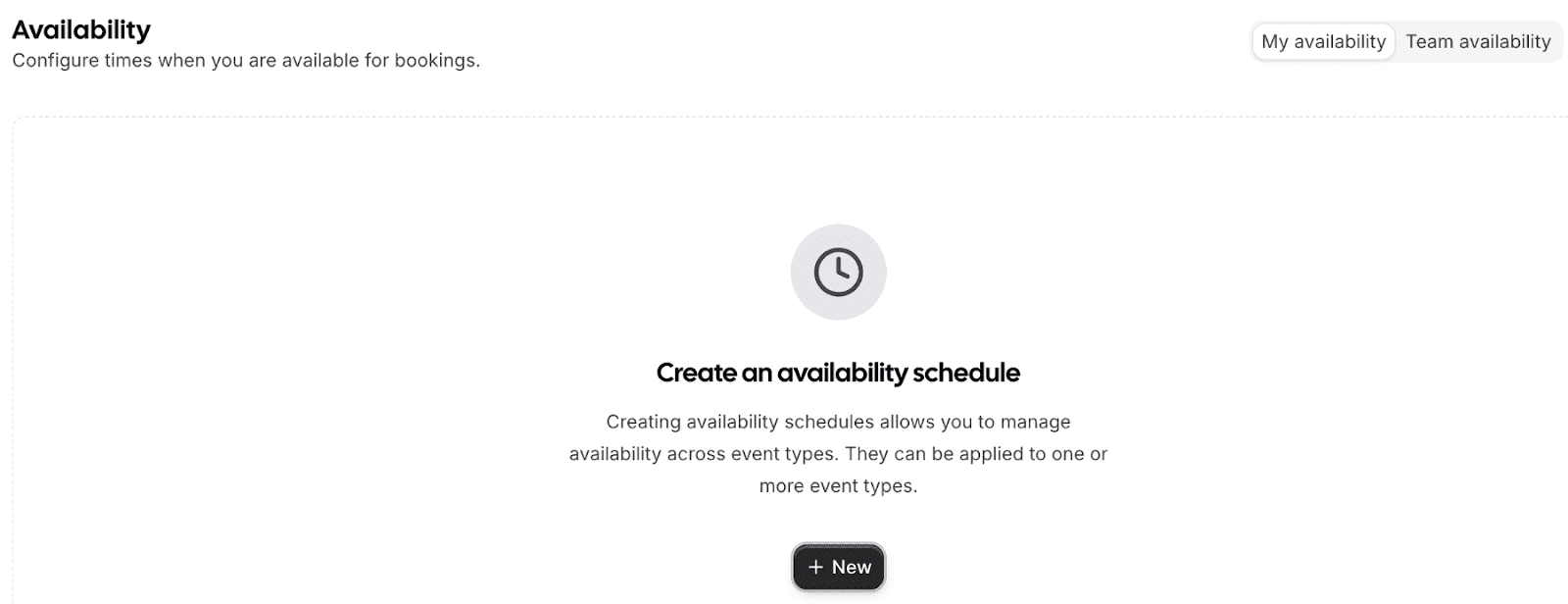
Define when you're typically available for meetings.
Default availability includes:
Days of the week
Hours per day
Time zone
Buffer time between meetings
You can create multiple availability schedules later. This default schedule applies to new event types automatically.
Step 5: Create Your First Event
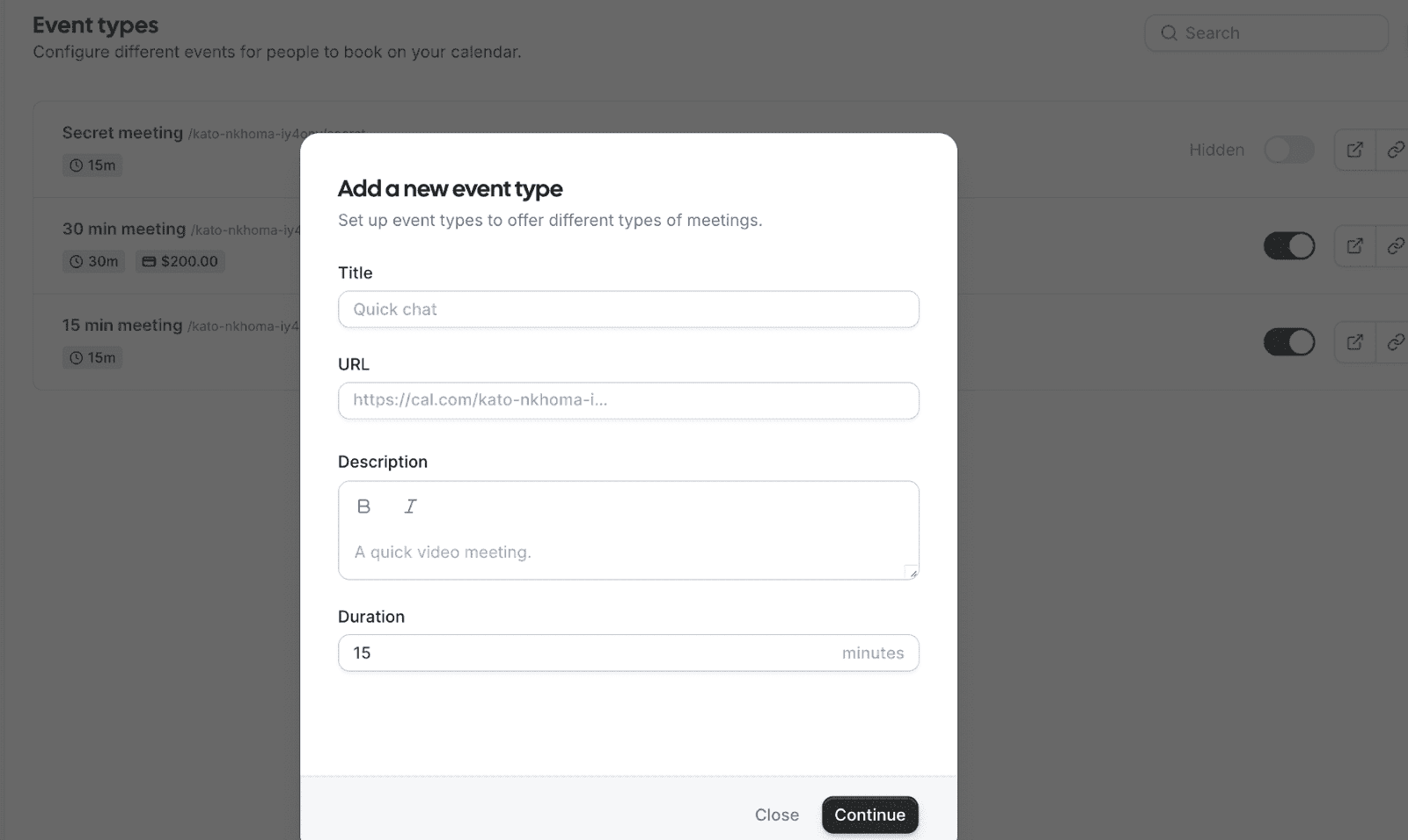
Click "New Event Type" to create your first bookable meeting.
Required settings:
Event name (e.g., "30-Minute Consultation")
Duration
Availability schedule to use
Optional settings:
Custom URL slug
Description
Location (in-person, video call, phone)
Booking questions
Payment requirement
Confirmation message
Step 6: Share Your Link
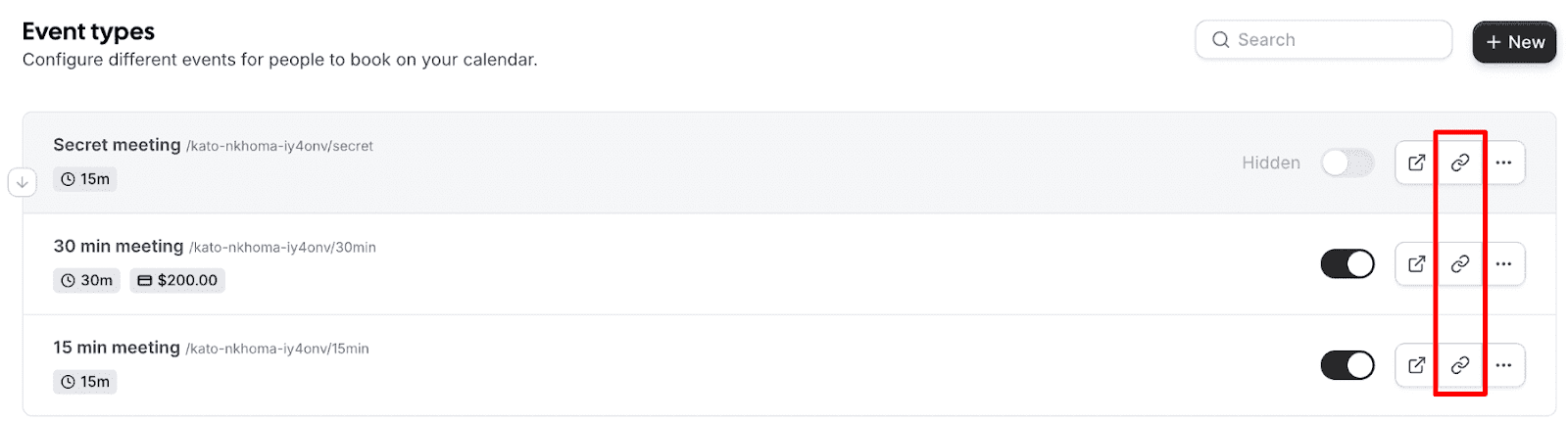
Once you create your event, you get a shareable link like cal.com/yourusername/30min.
Share this link anywhere:
Email signatures
Website
Social media profiles
Business cards
Direct messages
People click your link, see your available times, and book instantly. No back-and-forth emails.
Setting Up Recurring Appointments
Cal.com simplifies setting up recurring appointments, a feature indispensable for businesses that rely on regular meetings or sessions.
This functionality is particularly beneficial for service providers such as consultants, therapists, and fitness trainers, where consistent scheduling is key.
Here’s how to do it:
Step 1: Create an Event
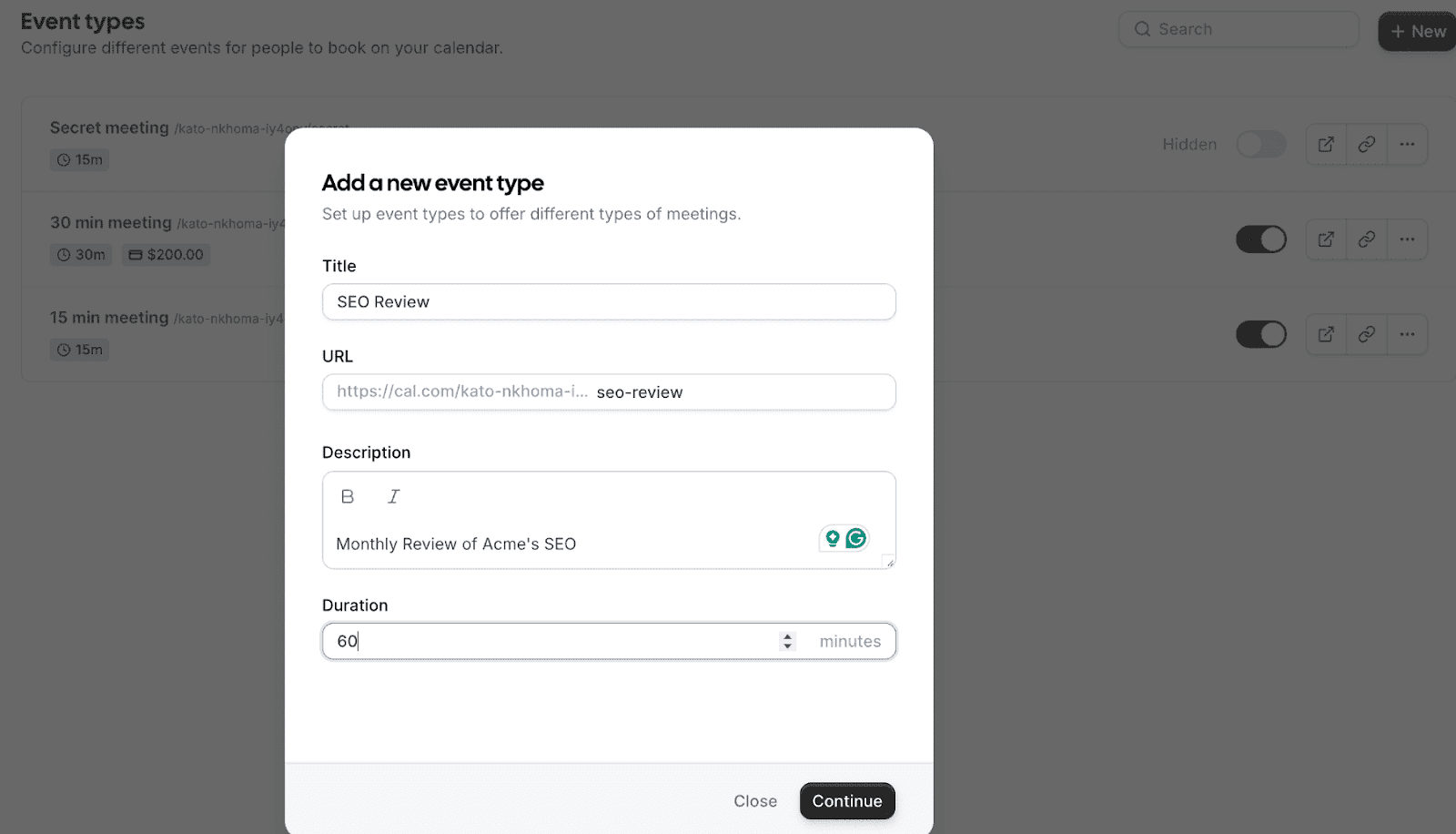
The first step to creating recurring events is to go to Event Types, then create a new event.
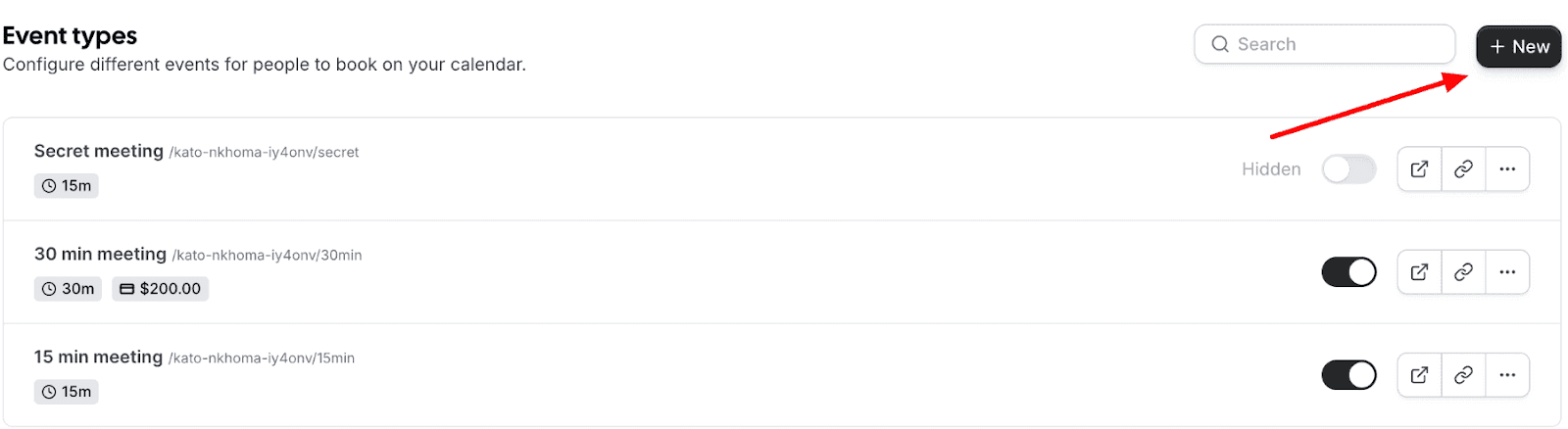
Next, fill in the event details and click Continue:
Step 2: Set the Event Location
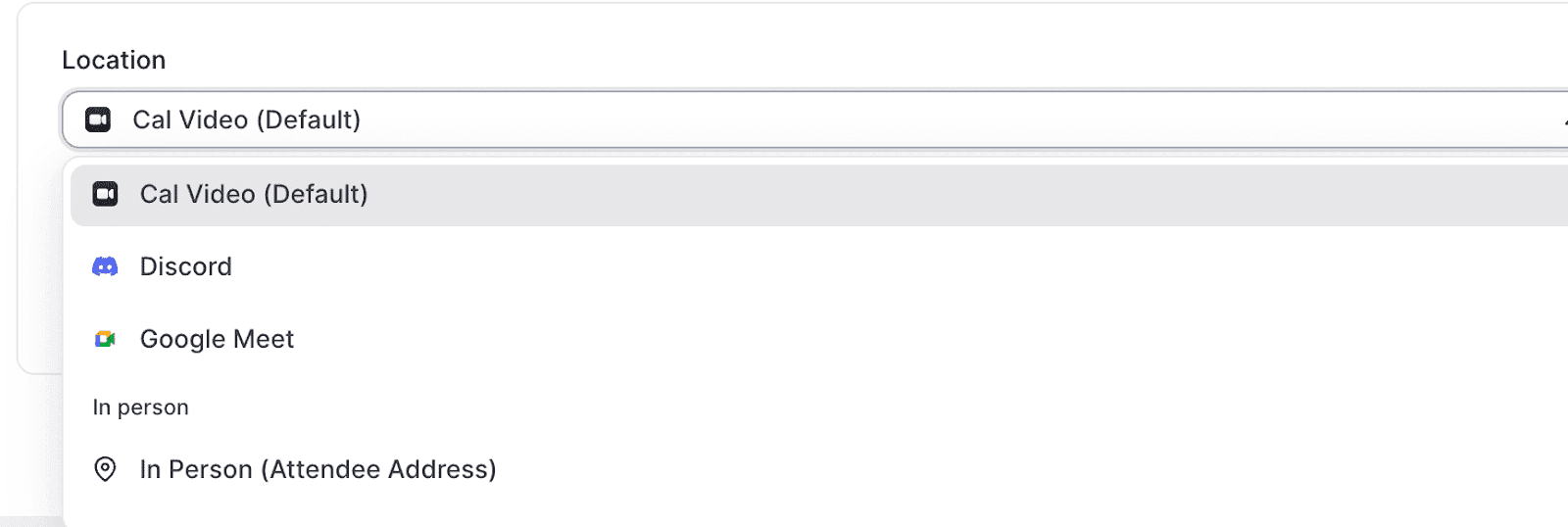
Event location is the platform you’ll use to meet. Location can be in-person or on video conferencing tools like Cal Video, Zoom, Google Meet, Discord, and more.
Step 3: Set Up Your Repeating Schedule
To set your repeating schedule, click Recurring and select the frequency you want your event to repeat.
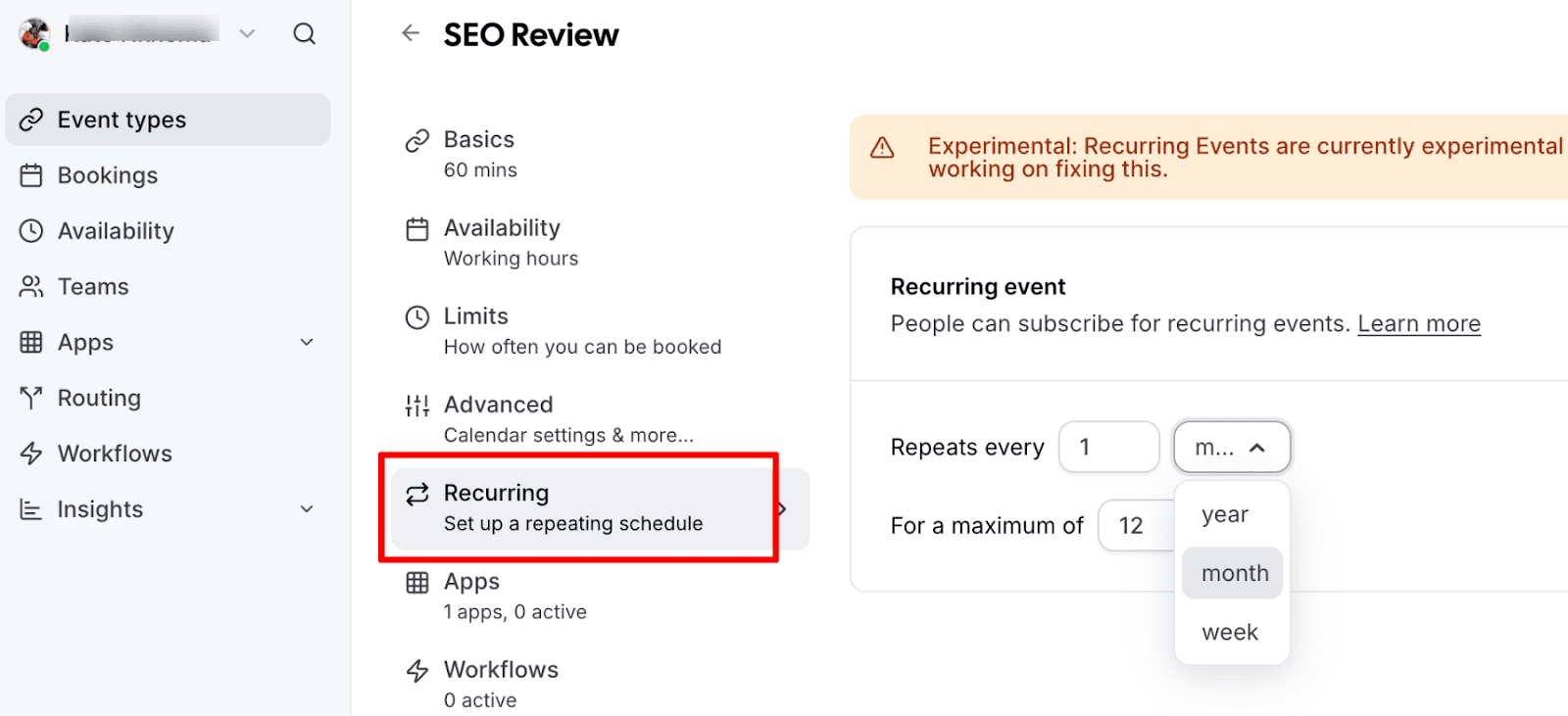
You can set your events to repeat weekly, monthly, or yearly. You can also set the maximum number of times the event repeats. This is great for times when you have a contract with a set duration and a stipulated number of meetings.
Once done, click Save.
And that’s it! Setting up recurring events with Cal.com is that easy.
Tips for Effective Recurring Appointment Management
To optimize the benefits of recurring appointments, certain practices should be adopted. These practices not only streamline the business scheduling process but also enhance client engagement and overall service quality. Below are some recurring scheduling techniques:
Clearly Define Appointment Types
It's essential to categorize appointment types, such as initial consultations, regular check-ups, and follow-up sessions. This differentiation helps streamline the scheduling process and set clear expectations for clients.
Utilize Customizable Reminders
Leverage Cal.com's feature to send tailored reminders and follow-up messages. These reminders should be customized according to the nature of the appointment, therefore enhancing client preparation and engagement. Personalized messages can provide specific instructions or information relevant to the upcoming appointment, ensuring clients are well-prepared and reducing no-shows.
Monitor Client Preferences
Paying attention to client feedback regarding scheduling is crucial. Adjust your appointment schedules to align with their preferences and enhance their experience. This could involve changing the time of day for certain appointments, adjusting the frequency of recurring meetings, or even modifying the duration of sessions to better suit client needs.
Leverage Analytics
Utilize the analytics tools provided by Cal.com to monitor the success and attendance rates of your recurring appointments.
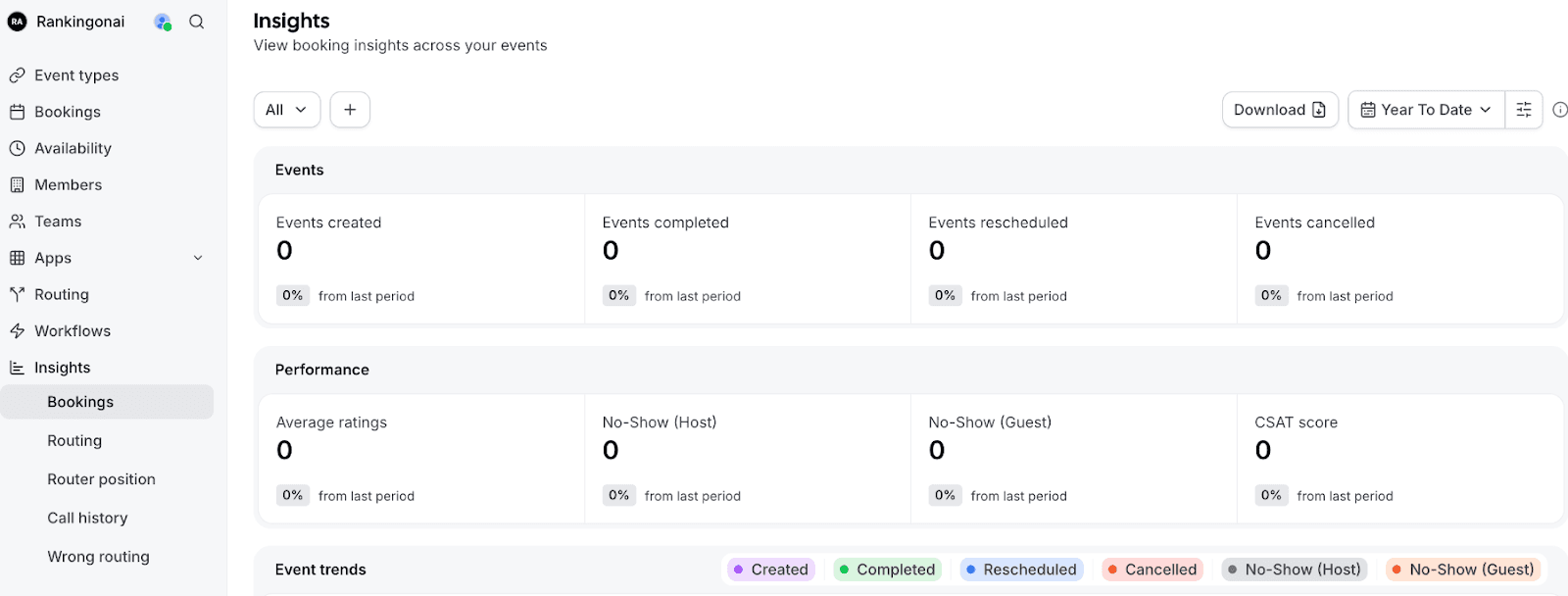
Analyzing this data can reveal insights into peak times, client preferences, and areas for improvement, helping you make informed decisions about your scheduling strategy.
Stay Flexible with Rescheduling
Offering easy, flexible rescheduling options is important for accommodating clients' needs while maintaining a structured schedule. This flexibility can be a key factor in client retention, as it demonstrates understanding and adaptability to their changing circumstances.
Keep Your Calendar Updated
This ensures that the scheduling system reflects your current availability, preventing overbooking and scheduling conflicts. An up-to-date calendar also helps clients make informed decisions when booking or rescheduling appointments.
By following these tips, businesses can effectively manage their recurring appointments using the platform. This not only enhances client satisfaction and engagement but also ensures a smoother, more efficient operational process.
Need to Maximize Efficiency with Recurring Appointments?
If recurring appointments are central to your business, efficiency is not optional. It directly impacts revenue, team productivity, and client satisfaction. Manual scheduling creates friction, increases errors, and limits your ability to scale. Automation removes those bottlenecks and gives you back control of your time.
Whether you are a solo professional or a growing enterprise, Cal.com provides the flexibility, integrations, and advanced features needed to streamline operations without sacrificing control.
FAQs on Recurring Appointment Scheduling
What is a recurring appointment?
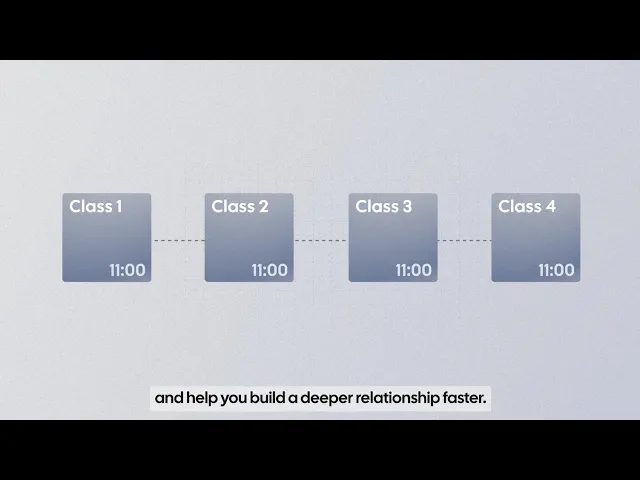
A recurring appointment is a meeting or session that repeats automatically at set intervals, such as weekly, monthly, or yearly. Instead of booking each session manually, scheduling software like Cal.com allows you to define the frequency and duration once, and the system handles the rest.
How to automate appointment scheduling?
You can automate appointment scheduling by using dedicated scheduling software that syncs with your calendar, sets availability rules, and sends automatic confirmations and reminders. Tools like Cal.com let clients book directly from your availability, eliminate back-and-forth emails, and trigger workflows such as reminders, follow-ups, and even payment collection.
Why would you schedule a recurring meeting?
Recurring meetings are ideal for ongoing commitments such as weekly coaching sessions, therapy appointments, team check-ins, fitness classes, or monthly strategy calls. They save time, ensure consistency, improve accountability, and make long-term planning easier for both businesses and clients.
What is an example of a recurring event?
Examples of recurring events include a therapist meeting a client every Tuesday at 3 PM, a fitness trainer running a class every Monday and Thursday morning, or a sales team hosting a monthly pipeline review. These events repeat automatically based on the schedule you define.
How to create a recurring appointment?
To create a recurring appointment in Cal.com, simply create a new event type, enable the “Recurring” option, choose the frequency (weekly, monthly, or yearly), and set the number of occurrences if needed. Once saved, clients can book the series according to your predefined schedule without additional setup.

Get started with Cal.com for free today!
Experience seamless scheduling and productivity with no hidden fees. Sign up in seconds and start simplifying your scheduling today, no credit card required!







